
The Boring File That Makes AI Feel Like a Senior Engineer

Most teams meet AI coding assistants through a demo. It looks clean: fast generation, quick refactors, fewer rote tasks. Then reality arrives.
PR review time goes up. Engineers spend effort correcting “almost right” changes. The assistant moves fast, but it doesn’t consistently follow your repo’s expectations—how you run tests, where logic belongs, what “safe” means in logging, or which conventions are non-negotiable. In regulated or customer-facing systems, this inconsistency isn’t just annoying; it increases operational risk.
That’s not a model issue. It’s an onboarding issue.
AI agents don’t absorb institutional context through osmosis. If the context isn’t persistent, every session starts with improvisation. And improvisation is expensive at enterprise scale—because it translates into supervision, rework, and uneven quality.
The simplest fix is also the least glamorous: agent memory files—small, versioned instructions that load reliably and keep behavior consistent across sessions, engineers, and tools.
The Real Problem: Every Assistant Wants a Different “Source of Truth”
As soon as multiple tools enter the workflow, a predictable failure mode appears:
- Tool A expects instructions in one place
- Tool B expects a different format
- Some tools load rules per folder (great in theory, chaotic without governance)
- Teams duplicate instructions to “make it work everywhere”
That duplication creates instruction drift. Over time, assistants behave differently depending on which file they read—exactly the opposite of what governance is supposed to achieve. The cost shows up as inconsistent PR quality, unpredictable refactor scope, and “why did it do that?” moments that waste senior engineering time.
The goal is straightforward:
One canonical set of rules, plus thin tool-specific adapters when required.
1) CLAUDE.md: The Briefing Note for Claude Code
Treat CLAUDE.md as a short briefing that prevents repeated errors:
- authoritative build/run/test commands
- repo-specific conventions that matter
- guardrails (security, logging, migrations)
- pointers to deeper docs and runbooks
The best CLAUDE.md reads like an internal onboarding note: tight, specific, and optimized for “do the right thing by default.”
Example:

Initialization workflow: useful, but only as a draft
Some Claude Code setups support an initializer flow (commonly invoked as /init) that generates a starter instruction file. It’s useful as scaffolding, but it’s rarely “enterprise-ready” on first pass.
A practical approach:
- remove generic filler (“write clean code,” “be helpful”)
- keep only repo-specific instructions and guardrails
- route depth via imports to docs that already have owners
This keeps CLAUDE.md maintainable and prevents it from becoming a second, stale README.
2) AGENTS.md: The Cross-Tool Canonical Baseline
AGENTS.md works best as the tool-agnostic source of truth: baseline expectations any assistant should follow. This is where “how we build software here” becomes durable—especially across multiple IDEs and assistants.
Template: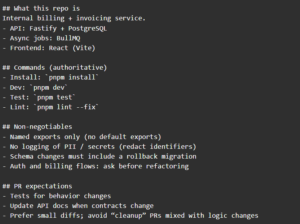
Precedence matters (especially in monorepos)
In many setups that support AGENTS.md:
- the closest AGENTS.md to the file being edited can take precedence (helpful when different apps/packages have different rules), and
- the user’s explicit prompt can override defaults
That’s a feature, not a weakness. It allows global governance plus local nuance—without turning the system into a rigid policy engine that engineers fight.
3) The “Rules File” Ecosystem: Cursor, Copilot, Windsurf, Jules
Tool-specific formats still exist. Common examples:
- GitHub Copilot: .github/copilot-instructions.md
- Cursor: .cursor/rules/*.mdc (often with frontmatter + activation)
- Windsurf: rules under its conventions (commonly .windsurf/…)
- Google Jules: JULES.md
The strategy remains the same: avoid duplicating shared rules. Keep the baseline in AGENTS.md, then use tool-specific files only to express things that are genuinely tool-specific (activation behavior, IDE workflow constraints, etc.).
Cursor .mdc rules: useful for targeted constraints
Cursor rules can support metadata and activation modes, which makes them valuable for folder-specific guidance—especially in monorepos where a mobile app, console, and backend might live together.
.mdc example:
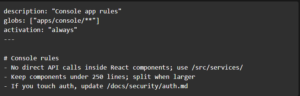
The key is restraint: use .mdc for what Cursor uniquely needs, not for the same “install/test/lint” rules you already captured in AGENTS.md.
4) Auto-Memory: A Separate Memory Layer Outside the Repo
Repo files (AGENTS.md, CLAUDE.md) are governed and committed. Auto-memory is different:
- usually stored outside the repo
- created per project (and often per developer environment)
- written by the tool as notes that reduce repeated context and rediscovery
A common path pattern for Claude:
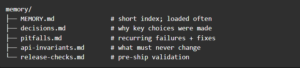
~/.claude/projects/<project-name>/memory/
Layout:
Keep the index short by design
Some implementations only auto-load a bounded slice of the index (the original article cites ~200 lines). In practice, that means:
- keep MEMORY.md tight and navigable
- put depth in topic files
- prune regularly so old “truths” don’t mislead the agent
This is also where security hygiene matters: avoid storing secrets, raw customer data, or anything you wouldn’t want copied into a chat transcript.
Config toggle (kept accurate)
CLAUDE_CODE_DISABLE_AUTO_MEMORY=0
5) A Setup That Prevents Instruction Drift
A stable setup typically uses three layers:
- AGENTS.md — canonical baseline, shared across tools
- CLAUDE.md — Claude-specific routing + workflow hints
- CLAUDE.local.md — personal preferences (not team policy)
That separation prevents a common failure: individuals’ preferences accidentally becoming organizational standards.
CLAUDE.local.md example: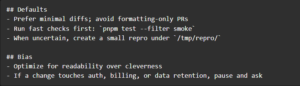
6) The “One Source of Truth” Trick: Link Back Instead of Copying
If the same instruction exists in two places, it will diverge. It’s not a question of “if,” it’s a question of “when.”
So when multiple tools require different files, use thin wrappers or symlinks back to the canonical file.
Symlink approach:
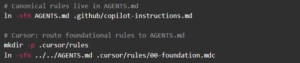
This turns instruction management into a reviewable, centralized surface—exactly what teams want when governance and consistency matter.
Anti-Patterns That Look Efficient (and then cost you)
1) The Mega-Instructions Document
It feels like governance: “one file, everything inside.” In reality, it becomes noisy, stale, and hard for both humans and agents to follow consistently. Keep the always-loaded file short (commands + guardrails), and route depth to owned docs.
2) Copy-Pasting Rules Into Every Tool Format
Teams duplicate the same guidance into CLAUDE.md, AGENTS.md, Copilot files, Cursor rules, and more—then spend months debugging drift. One file gets updated, another doesn’t, and behavior becomes inconsistent. Pick one canonical baseline (AGENTS.md) and keep tool-specific files as thin pointers/wrappers.
3) “The README Is Enough”
READMEs are great for humans understanding a project, but they’re rarely optimized for agent behavior: exact commands, negative constraints (“never log PII”), and workflow guardrails. Keep README for narrative context; keep memory files for operational correctness.
4) Auto-Memory Without Curation
Auto-memory is powerful, but unreviewed accumulation turns into outdated “truths” and risk (especially around sensitive data). Keep the index tight, push durable guidance into repo-governed docs, and prune periodically.
Closing: The Compounding Advantage Isn’t Speed — It’s Consistency
The enterprise payoff is not that AI writes code quickly once. It’s that the agent stops relearning the same basics every session and starts operating within your standards by default.
That’s what memory files enable:
- less supervision
- fewer regressions
- more consistent engineering hygiene
- fewer compliance surprises
- faster onboarding for new engineers and new agents alike
If AI is going to be part of delivery, this is one of the highest-leverage ways to make it dependable.
Leave a Reply