
OneLake Security: The Architecture of Trust in Microsoft Fabric

Most enterprises don’t suffer from a lack of data — they suffer from a lack of control over how that data is accessed, shared, and trusted. Every platform brings its own access model, its own semantics for “who can see what,” and its own audit framework. That fragmentation has quietly become one of the biggest inhibitors to scaling AI responsibly.
Every data platform — the Data Warehouse, Data Lake, and BI layer — tends to invent its own definition of security. A table in SQL uses one permission model. A Delta table in a Lakehouse uses another. A Power BI dataset enforces yet another layer of access control and row-level logic. The result: the same person can have inconsistent rights depending on which tool they use, where the data sits, or how it’s queried.
This patchwork isn’t just administrative overhead — it’s a governance liability. Every duplicated role or rule increases the risk of overexposure, audit exceptions, and security drift. It also slows innovation: teams hesitate to share data across domains because access control can’t keep up.
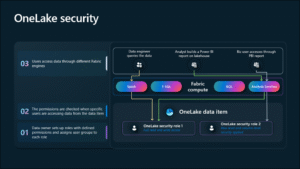
OneLake Security changes that model fundamentally. Instead of each service defining its own rules, Fabric introduces a single, consistent access framework that applies across Data Warehouse, Lakehouse, Notebooks, and BI (DirectLake). Access policies live with the data itself and are interpreted consistently by every engine in Fabric. That means one role, one rule, one definition of trust — regardless of how or where the data is used.
This unification is what makes OneLake Security more than a compliance feature; it’s the foundation of a true enterprise data fabric — one identity, one permission model, one audit trail.
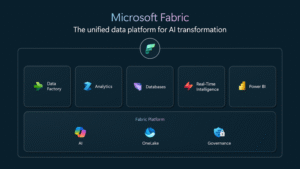
What’s New in OneLake Security? (Public Preview)
- One policy plane at the lake layer Authorization is defined and stored in OneLake and enforced consistently by Fabric engines—no more per-tool permission silos.
- Data-scoped roles with fine-grained controls Roles comprise Scope (folder/table), Permissions (Read/Write/Manage), Members (users or Microsoft Entra ID groups), and Constraints (RLS/CLS applied at query time).
- Two access modes for SQL Analytics Endpoint User Identity Mode: OneLake roles govern access (centralized, Entra ID-backed). Delegated Identity Mode: Traditional SQL GRANT/REVOKE governs access (DBA-friendly compatibility).
- Deny-by-default with inheritance Users start at zero access; parent folder permissions cascade downward. When multiple roles apply, effective access is the union of grants.
- Consistent enforcement across engines Supported today: Lakehouse, Spark Notebooks, SQL Analytics Endpoint (User Identity Mode), DirectLake semantic models. On the near-term roadmap: Warehouse (T-SQL endpoint), Eventhouse, external tables.
- Shortcuts-aware governance Policies extend across OneLake shortcuts (delegated/passthrough), keeping enforcement consistent for linked or cross-workspace data.
- Unified auditing and lineage Access/activity flows into Fabric monitoring and integrates with Microsoft Purview / Defender for Cloud for end-to-end traceability.
- Enterprise security posture Encryption at rest (FIPS 140-2) and in transit (TLS 1.2/1.3). (Customer-managed keys are not supported in preview.)
- BI and AI alignment Native fit for Power BI DirectLake and Fabric AI experiences, so downstream analytics and AI inherit the same access policy without re-modeling security.
What Architects Should Test First
To move from exploration to implementation, these three quick pilots will surface both promise and practical gaps:
- Role propagation in a business domain Start with a Finance or HR Lakehouse. Create data-scoped roles at the folder level and test how inheritance flows to downstream semantic models and Power BI reports. Validate that RLS and CLS definitions persist end-to-end.
- Cross-workspace shortcuts Build a shared data domain using OneLake shortcuts that link to another workspace. Confirm that policies apply consistently across both and that access is still enforced when queried from Spark or SQL endpoints.
- User vs. Delegated Identity modes Run the same workload under both modes in the SQL Analytics Endpoint. Measure differences in audit logs, access latency, and administrative effort to decide which model fits your governance pattern.
These experiments expose where the preview stands today — and how much closer enterprises can get to a unified trust fabric cutting across data, analytics, and AI.
Watch: Microsoft Fabric — OneLake Security Deep Dive
Why This Matters
For years, enterprise data strategies have traded off control for speed. OneLake Security begins to reconcile both.
- Unified data-layer enforcement – Define access once in OneLake and apply it consistently across Fabric workloads.
- Fine-grained protection – Folder, table, row, and column-level access enable contextual visibility without duplication.
- Governance as architecture – Enforcement occurs inside the storage tier, not on top of it — every workload inherits the same rules.
- Least privilege by default – Users start with zero access until explicitly granted permissions via OneLake roles.
This permits governance to scale at the same pace as innovation — essential for responsible AI and data-product maturity.
Technical Foundation
This isn’t just a policy layer—it’s engineering.
Role-Based Access Control (RBAC)
- Scope — Folder, table, or sub-folder in OneLake.
- Permissions — Read, Write, Manage.
- Members — Users or Microsoft Entra ID groups.
- Constraints — Row-level (RLS) and column-level (CLS) filters enforced during query execution.
Dual Access Modes
- User Identity Mode — OneLake roles govern access using Entra ID for unified identity propagation.
- Delegated Identity Mode — Existing SQL roles retain control for DBA workflows.
Security Inheritance
Folder-level roles cascade downward; effective access is the union of assigned roles.
Engine Coverage (Public Preview)
- Supported: Lakehouse, Spark Notebooks, SQL Analytics Endpoint (User Identity Mode), DirectLake semantic models.
- Planned: Warehouse (T-SQL endpoint), Eventhouse, external tables.
Shortcuts and Shared Datasets
Security definitions extend across OneLake shortcuts — enforcement remains consistent for linked or cross-workspace data.
Encryption and Compliance
Data is encrypted at rest (FIPS 140-2) and in transit (TLS 1.2/1.3). Unified audit logs integrate with Microsoft Purview and Defender for Cloud.
Deepening the Technical Foundation with Best Practice Insights
From Microsoft’s implementation guidance and field experience, several architectural best practices stand out:
- Deny-by-default and least privilege Begin with zero access and add permissions deliberately. Avoid overusing workspace roles; favour OneLake data roles to restrict access at folder or table level.
- Define roles like data products Each role should have a clear scope, permission set and business purpose. Treat roles as living objects that evolve with the dataset lifecycle.
- Use RLS and CLS wisely: RLS filters rows dynamically based on attributes such as region or department. CLS hides sensitive fields while keeping others visible. Define both within the same role to prevent inconsistent enforcement.
- Exploit OneLake’s hierarchy Parent permissions cascade by default. Use that to build domain-level patterns, but test for over-exposure when users belong to multiple roles.
- Audit everything Audit logs capture role creation, changes and access grants. Build automated reviews and expiry cycles for temporary or project-based roles.
- Harden the perimeter Secure access endpoints using Conditional Access, Private Links, and Entra ID policies. Even the best data-layer security depends on a tight control plane.
- Plan for preview limitations Because OneLake Security is public preview: Some engines may not yet enforce RLS/CLS. Customer-Managed Keys (CMK) aren’t supported. Design pilots with these constraints in mind.
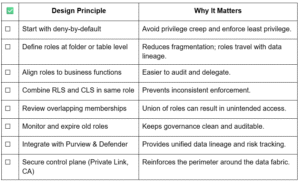
Architect’s Quick Checklist
Connecting the Dots: Why the Comparison Matters
As enterprises modernise their data estates, a question naturally emerges: how does OneLake Security compare to Databricks Unity Catalog? Both projects aim to simplify governance and provide a single control plane. But while the goal appears similar, their scope and integration approach differ significantly. Understanding that distinction helps architecture teams decide where each tool fits — and how to design hybrid governance without overlap or lock-in.
OneLake Security vs. Unity Catalog
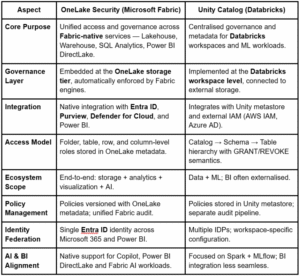
In plain terms:
- Unity Catalog governs within Databricks — securing data engineering and ML pipelines.
- OneLake Security governs across Microsoft Fabric — spanning data, analytics, and AI.
If your enterprise standardises on Fabric, Power BI, and Entra ID, OneLake Security offers a more natural path toward one consistent governance experience without stitching multiple control planes together.
Strategic Impact
For CDOs and CDAOs, this is about trust velocity — the ability to move fast without losing control.
- Reduced governance overhead – No duplicated ACLs across Spark, SQL, and BI.
- Simplified audits – OneLake logs unify lineage and access reviews.
- Data-product maturity – Security becomes a design-time attribute, not a retrofit.
- AI readiness – GenAI and agentic systems can safely consume governed data.
- Operational resilience – Centralised roles reduce configuration drift and human error.
Execution Priorities for Architecture and Data Leadership
- Pilot in a sensitive domain — Finance, HR, or ESG where controls are currently fragmented.
- Refactor roles — Align roles to business functions (“Risk Analyst Read”) rather than system names.
- Integrate Entra ID grouping — Reflect organisational hierarchies for delegation and audit.
- Embed in data-product templates — Make “security definition” a non-negotiable part of the data product lifecycle.
- Automate audits — Stream OneLake access logs into Purview and Sentinel for continuous compliance scoring.
Peer-Level Reflection
For senior technology leaders, governance is no longer about control; it’s about confidence — knowing your data can move fast without breaking trust. OneLake Security proves that trust can be engineered: a programmable security fabric where data flows safely between domains, analytics, and AI pipelines.
For enterprises embracing GenAI, Agentic AI, or multi-cloud data fabric, this is the control plane that transforms compliance into competitive advantage.
Leadership Call to Action
Over the next year, the enterprises that scale AI responsibly will be those that design for trust at the data layer. OneLake Security may still be in public preview — but it’s a signal that data platforms are finally catching up to our governance realities.
Now is the time to redefine how your organisation encodes access, ownership, and accountability. In this new data-fabric economy, trust isn’t a policy. It’s an architectural choice.
Industry Perspective
Consulting firms and system integrators should view this moment as a reset point. The services offering model is shifting. Data and security aren’t separate siloes anymore — they are interwoven deliverables in every modern digital transformation. With OneLake Security, partners must evolve from delivering “data migration + BI reports” to enabling data-access fabric programs.
Key industry levers:
- Governance accelerators – Define reusable data-domain roles and mappings; speed deployment of OneLake Security at scale.
- Audit and compliance frameworks – Feed OneLake log streams into Purview/Sentinel; surface unified dashboards for governance teams.
- AI-trust readiness – Embed access-policy design into GenAI and Copilot pipelines so data science teams inherit governance from day one.
- Operational playbooks – Establish managed services for role lifecycle, entitlement review, and continuous policy optimization.
- Hybrid ecosystem guidance – Many enterprises will operate both Databricks and Fabric. Partners that can map when to use Unity Catalog vs. OneLake Security — without bias or lock-in — will lead the market.
For advisors working with CDOs, CDAOs, and VPs of Analytics, now is the time to position governance-as-a-platform as a growth enabler, not a compliance cost.
Leave a Reply